While investigating an incident, I stumbled upon something surprising in our distributed traces: a simple JPA deleteAll query wasn’t executing as a batch delete. Instead, it was fetching all records into memory and deleting them one by one.
I always assumed that a repository method like this:
@Modifying
@Transactional
void deleteAllByAccessTokenExpiresAtIsBefore(Instant time);
would generate and execute a single SQL statement:
DELETE FROM oauth2_authorizations
WHERE access_token_expires_at < ?
But that’s not what was happening. Instead, it was fetching all the records, bringing them to memory, and deleting them one by one:
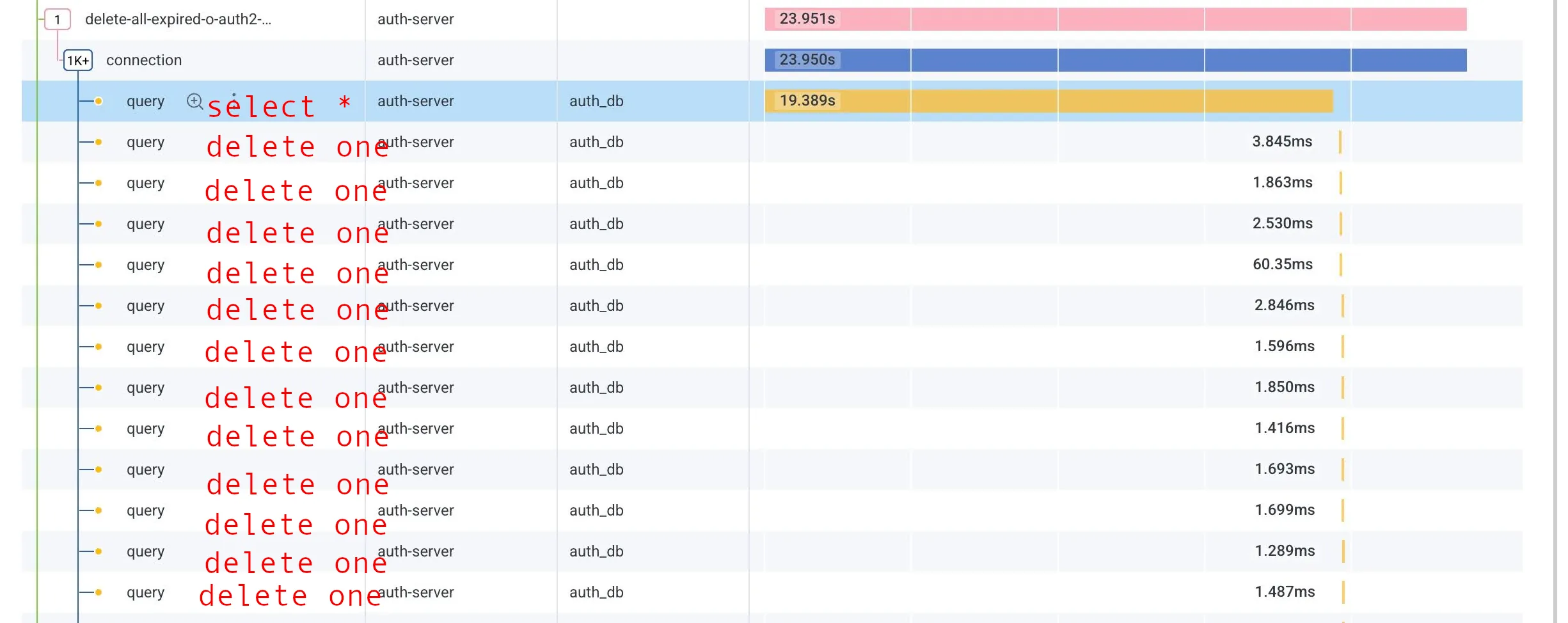
Datadog trace showing JPA fetching all records and deleting them one by one
After consulting with AI and showing it the trace, it pointed me to the culprit: the @Version field in my entity.
The Root Cause: Optimistic Locking
My entity has a @Version field. This field is used for optimistic locking, a concurrency control mechanism that prevents conflicting updates by multiple transactions. When JPA updates or deletes an entity with a @Version field, it includes the version in the WHERE clause to ensure the entity hasn’t been modified by another transaction.
Because of this, JPA needs to load each entity into memory to check its version before deleting it:
delete from oauth2_authorizations where id=? and version=?
This prevents batch deletes from working as expected.
The Solution
The fix is to add an explicit @Query annotation with a JPQL delete statement:
@Modifying
@Transactional
@Query("DELETE FROM Authorization a WHERE a.accessTokenExpiresAt < :time")
void deleteAllByAccessTokenExpiresAtIsBefore(@Param("time") Instant time);
This bypasses JPA’s entity loading mechanism and executes the delete as a single SQL statement.
Important Trade-off
By using an explicit query, you’re bypassing optimistic locking protections. The delete statement won’t check the version field, which means:
- Pro: Significantly better performance for bulk deletes
- Con: No protection against concurrent modifications during deletion
In this case, it was acceptable because we were deleting expired tokens that were unlikely to be modified concurrently. However, if you’re deleting entities that might be actively updated by other transactions, you need to carefully consider whether losing optimistic locking guarantees is acceptable for your use case.
Key Takeaway
Pay extra attention to batch queries on entities with @Version fields. JPA’s default behavior prioritizes data consistency over performance by loading entities to check versions. If you need performance and can accept the trade-off, an explicit @Query is the way to go. This is just one of many subtle behaviors to watch for when working with Spring Boot and JPA.
Happy querying.