Timeout misconfiguration worries me, and despite being aware of it, when we were developing a new service, we set up many timeouts but forgot an important one. This tale is about that mistake.
My experience until now has been mostly with PostgreSQL. While I’ve used MongoDB before, I hadn’t set up a service from scratch with comprehensive configurations.
When creating this new service, I tried to establish the best MongoDB configuration possible. We focused not just on timeouts but also on improving observability with Spring Data, adding several timeouts: connect timeout, read timeout, server selection timeout, and configuring the connection pool (size, wait time, idle time, etc.), along with write and read concerns. Here’s the code (with hardcoded values for simplicity):
 @Override
@Bean
@NonNull
public MongoClientSettings mongoClientSettings(String connection) {
    MongoClientSettings.Builder builder = MongoClientSettings.builder()
            .uuidRepresentation(UuidRepresentation.STANDARD)
            .applyConnectionString(new ConnectionString(connection))
            .applyToConnectionPoolSettings(b -> b.maxSize(50)
                    .minSize(5)
                    .maxWaitTime(Duration.ofMillis(2000).toMillis(), TimeUnit.MILLISECONDS)
                    .maxConnectionIdleTime(
                            Duration.ofMinutes(30).toMillis(), TimeUnit.MILLISECONDS)
                    .maxConnectionLifeTime(
                            Duration.ofMinutes(30).toMillis(), TimeUnit.MILLISECONDS)
                    .addConnectionPoolListener(new MongoMetricsConnectionPoolListener(meterRegistry)))
            .applyToSocketSettings(b -> b.connectTimeout(
                            Math.toIntExact(Duration.ofSeconds(5)
                                    .toMillis()),
                            TimeUnit.MILLISECONDS)
                    .readTimeout(
                            Math.toIntExact(Duration.ofSeconds(10)
                                    .toMillis()),
                            TimeUnit.MILLISECONDS))
            .applyToClusterSettings(b -> b.serverSelectionTimeout(
                    Duration.ofSeconds(5)
                            .toMillis(),
                    TimeUnit.MILLISECONDS))
            .retryReads(true)
            .retryWrites(true)
            .addCommandListener(new MongoMetricsCommandListener(meterRegistry))
            .addCommandListener(new MongoObservationCommandListener(
                    observationRegistry, null, new SanitizingMongoObservationConvention()))
            .contextProvider(ContextProviderFactory.create(observationRegistry));

    if (customProperties.getConsistency().getReadConcern() != null) {
        builder.readConcern(ReadConcern.LOCAL);
    }
    if (customProperties.getConsistency().getWriteConcern() != null) {
        builder.writeConcern(WriteConcern.MAJORITY.withWTimeout(Duration.ofSeconds(10).toMillis(), TimeUnit.MILLISECONDS));
    }

    return builder.build();
}
I thought we were covered with all the timeouts, but I was surprised when investigating some incidents and checking the Query Profiler in MongoDB Atlas UI.
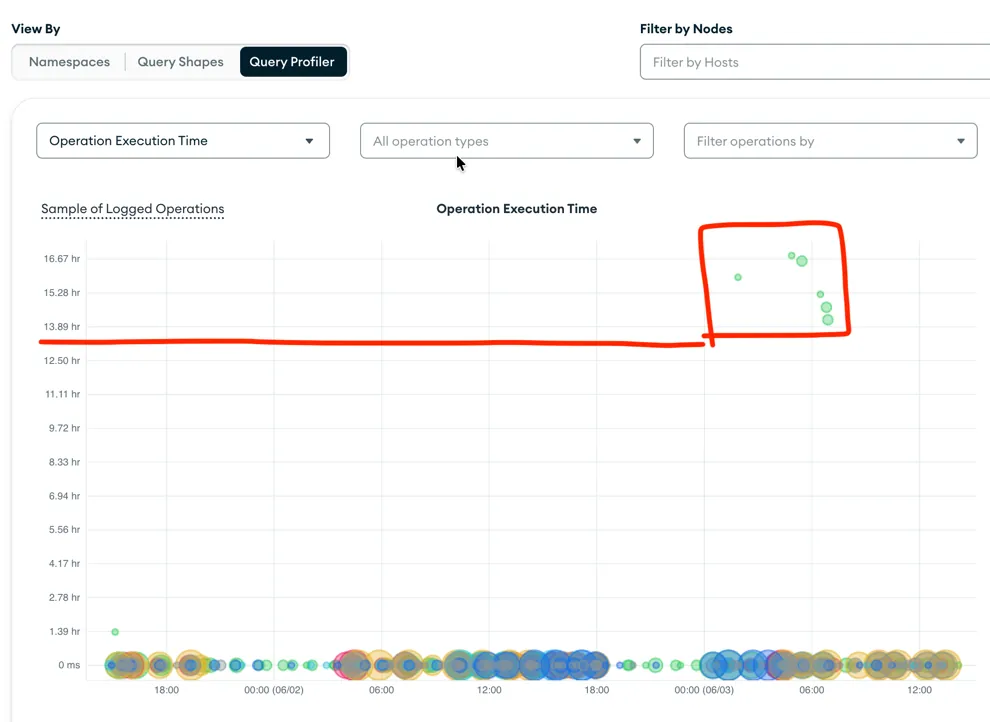
Query Profiler in MongoDB Atlas showing the query that ran for over 14 hours on the server side
Despite having a read timeout of 10 seconds, the application received the exception and handled it correctly. However, the query continued running on the server side and took more than 14 hours as it scanned the entire collection.
What we missed was a timeout to limit server-side processing.
This can be done in a few ways. The simplest is something like this:
MongoClientSettings.Builder builder = MongoClientSettings.builder()
    ...
    .timeout(Duration.ofMinutes(10).toMillis(), TimeUnit.MILLISECONDS)
    ...
    return builder.build();
The downside is that this timeout applies to all queries, including migrations when using Mongock as a migration library helper.
Another approach is to define the timeout on individual queries, giving you more granular control.
What we did was set a high value globally just to prevent server-side execution from running indefinitely on longer queries. Since most queries would fail due to the readTimeout anyway, this seemed like a reasonable safety net.
With this in place, we hope to avoid those excessively long-running queries in the future.
Cheers.