In this post, I’ll show how I set up observability for a reactive Spring AI app using WebFlux. Transitioning from imperative to reactive programming can be tricky, especially when it comes to observability. I’m not very familiar with reactive programming since almost all our backend services use the imperative Spring Web MVC. But as we started a new stack for Spring AI from scratch, we decided to use reactive programming with WebFlux because we wanted the UI to receive the chunks one by one as the model generates them.
I’m used to setting up observability for Web MVC, but doing it in a reactive environment was a bit challenging due to how the reactive context is propagated. That’s why I’m writing this. Also, Copilot wasn’t able to handle the reactive context propagation properly or recognize where tracing should be attached to fix everything for me, so I hope this post can help others facing the same issues.
I’m using the milestone version 1.1.0-M3 of Spring AI (
implementation("org.springframework.ai:spring-ai-bom:1.1.0-M3")because I need the Streamable-HTTP transport to call
the MCP servers. And Streamable-HTTP transport for now it is only available in the milestone version. It is risky, but I
am not fully in production yet and we I will be, hopefully the final version will be released.
Here are the main dependencies I used and what they do (Micrometer handles tracing integration, Reactor adds reactive context propagation, and OpenTelemetry exports the data):
implementation 'io.micrometer:micrometer-tracing-bridge-otel'
implementation 'io.micrometer:micrometer-tracing'
implementation 'io.projectreactor:reactor-core-micrometer'
implementation 'io.opentelemetry:opentelemetry-exporter-otlp'
The first thing was to make sure the upstream application was sending the
traceparent ([W3C Trace Context](https://www.w3.org/TR/trace-context/)) header (standard W3C Trace Context header).
After adding the dependencies, that was working well.
Next, I added a hook during application initialization to tell Reactor to propagate the context so we can have that beautiful trace across the whole request. This I kinda new from my previous Fixing Tracing Propagation in Spring WebFlux: A One-Line Solution experience.
Hooks.enableAutomaticContextPropagation(); // Enables automatic propagation of Reactor's Context across threads so observability tools can link spans properly. See Reactor docs: https://projectreactor.io/docs/core/release/reference/#context
One important thing to do is change the sampling value. I still don’t understand why 100% isn’t the default. After I had the 90% of distributed traces observability gone after Spring Boot upgrade problem, this value remained the same.
management:
  tracing:
    sampling:
      probability: 1
The HTTP calls and database traces were working, but there were no ChatModel spans. In fact, some database spans that happened afterward were being started as new traces.
Then I found that I needed to provide the ObservationRegistry to the chat model. At this point, I would have expected
it to get the default bean automatically, but apparently, it needed to be provided manually.
@Bean
public AzureOpenAiChatModel azureOpenAiChatModel(ObservationRegistry observationRegistry) {

    AzureOpenAiChatOptions options = AzureOpenAiChatOptions.builder()
            .deploymentName(deploymentName)
            .maxTokens(maxTokens)
            .build();

    return AzureOpenAiChatModel.builder()
            .defaultOptions(options)
            .openAIClientBuilder(new OpenAIClientBuilder()
                    .endpoint(endpoint)
                    .credential(new AzureKeyCredential(azureOpenaiApiKey)))
            .observationRegistry(observationRegistry) // provide the observationRegistry
            .build();
}
After adding it, the spans started to show up, but they were detached and forming new traces; very messy. This one was hard to figure out. I initially thought it was a reactive propagation issue and that the Mono/Flux context wasn’t flowing properly.

Spans starting a new trace instead of joining the parent
Even Copilot couldn’t help me with this after several tries.
I had to go old-school and started looking into Spring AI’s code to get some ideas. That’s when I found something interesting.
Even though I had added the ObservationRegistry to the ChatModel, the ChatClient that used that model wasn’t using
an ObservationRegistry.
Another odd thing is that it’s not part of the builder as a field — you need to pass it in the build() method. I would
assume Spring could inject this automatically, but even if it needs to be provided, the build() method is the last
place I’d look. If we’re following the Builder pattern, why not include it as a field?
Anyway, after changing the code to this:
@Bean
public ChatClient chatClient(AzureOpenAiChatModel model, ObservationRegistry observationRegistry) {
    return ChatClient.builder(model, observationRegistry, null).build();
}
it started to work perfectly, as you can see in the image below.
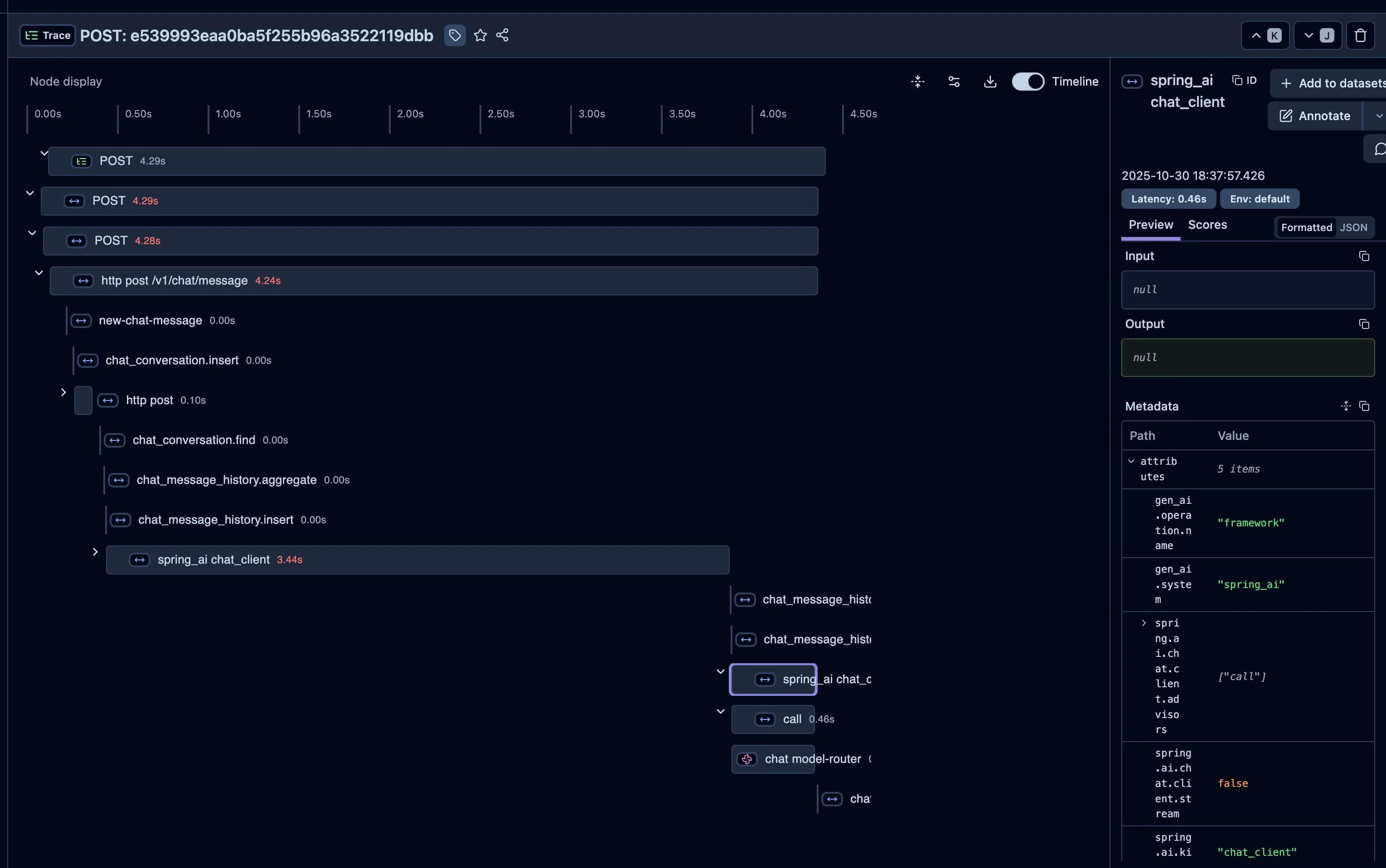
Context being propagated correctly
That’s basically it. Now my Spring AI with WebFlux application has a perfect trace for the chat endpoint.
In my case, I learned that getting observability right with Spring AI and WebFlux requires attention to how the reactive
context and ObservationRegistry are wired through your application. Once both the model and client share the same
context, you’ll finally see a clean, connected trace across all spans.
Cheers.